Post-closing collation eats days of non-recoverable time
Manual assembly means errors make it into the final record
Every binder looks different — formatting varies by team, partner or deal
How Legatics helps
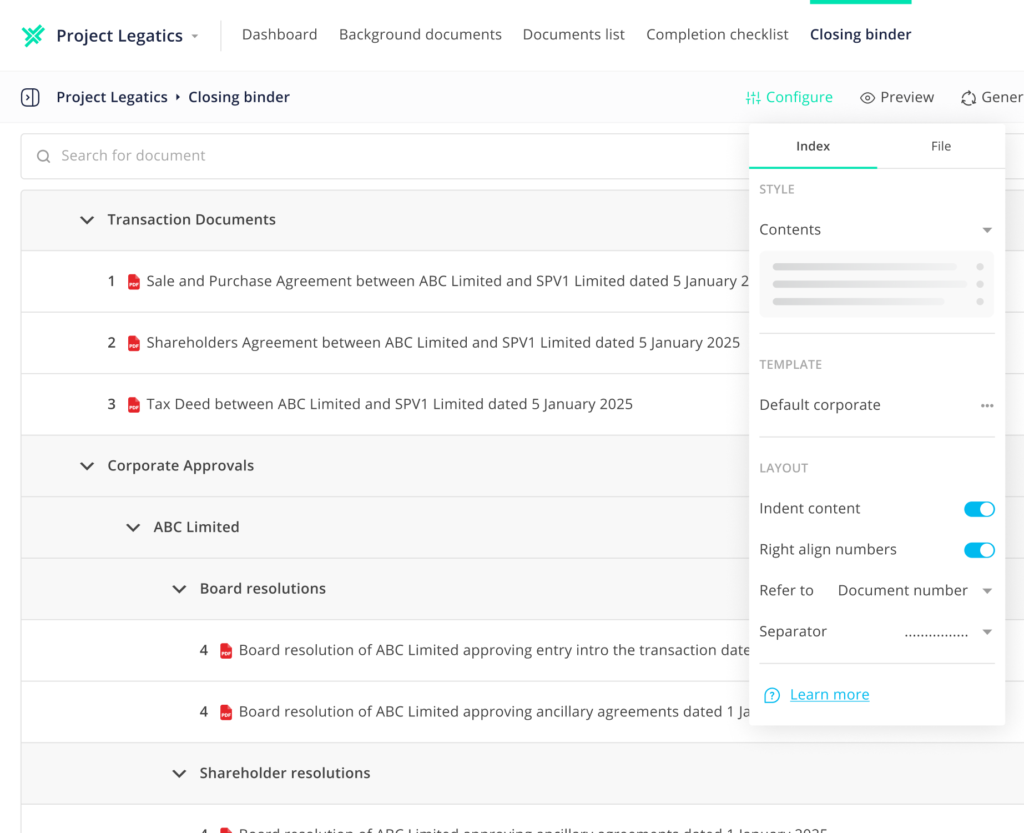
Generate complete, indexed binders directly from your matter
Firm-approved templates enforce consistency across every output
Flexible export formats ready for any recipient
Assembling binders shouldn’t be painful
Creating binders is often manual, time-consuming and error-prone. Valuable, non-recoverable time is lost on collation and formatting while your clients are kept waiting.
Legatics Binders automates the process so you can create and deliver professional, firm-branded binders, bundles or bibles quickly and efficiently.
Less time on binders, more on billable work
Manual assembly eats hours of non-recoverable time. Legatics automates the heavy lifting so your lawyers spend less time formatting and more on work that counts.
Fewer errors in the final record
Simple collation, automated indexing and structured templates reduce the risk of missing or incorrect documents making it into the binder your client keeps forever.
A professional finish, every time
Firm-approved templates ensure every binder looks like it came from your firm — consistent across matters, teams and deal types, whoever builds it.
The complete binder toolkit, built into your matter
Matter-native assembly
Pull documents directly from your Legatics matter or DMS into a single binder workspace. No re-downloading, no duplicate files, no version confusion.
Firm-branded templates
Create and manage index templates in Microsoft Word. Apply them to any binder — tailored by client, practice area or deal type.
Automated indexing
Legatics generates a structured, hyperlinked index from your template automatically. Every section bookmarked and navigable from the moment you export.
Flexible export formats
Download as a single merged PDF, ZIP folder or PDF portfolio of source documents. Hyperlinked, navigable and ready to send or store.
Multiple recipient versions
Generate separate binders for different recipients from the same matter. Control which documents each version contains without duplicating your work.
DMS integration
Export directly to your document management system. No manual filing, no saving locally and re-uploading.
How it works
Assemble easily
Bring all your documents together from any source in seconds, creating one organized binder workspace.
Configure perfectly
Shape your binder exactly how you want it. Focus on style and structure, without the formatting frustrations.
Export flexibly
Export professional, firm-branded binders in the format that fits your client’s need, whether single PDF, ZIP folders or PDF portfolio.
When to use Binders
Assembling binders straight from your matter
Pull documents directly from a Legatics list or your DMS into one binder workspace, without re-downloading or duplicate files.
Applying firm-branded templates
Create binder index templates in Microsoft Word, then apply them by client, practice area or deal type to keep every output consistent.
Producing separate binders for each recipient
Duplicate a binder to create tailored versions for different recipients, controlling which documents each version contains without rebuilding from scratch.
Exporting binders in the format your recipient needs
Download as a single merged PDF, a ZIP folder or a PDF portfolio, with bookmarks and hyperlinks included for fast navigation.
Use case: Regulatory and capital markets submission bundles
On capital markets and regulatory transactions, the binder itself is
Read More
Use case: Tailored recipient bundles
On many deals, the same binder needs to go out
Read More
Use case: Closing binders and closing sets
Once a deal completes, the team produces the closing bible
Read More
What clients actually see when you send them a closing binder
The closing binder is the last thing a client receives
Read More
Closing binders and the margin problem
There’s a category of work in every transactional practice that
Read More
How leading law firms manage closing binders
The closing binder is the final record of a transaction.
Read More
Closing made simple: How to instantly compile binders for real estate transactions
In real estate transactions, the finish line often feels like
Read More
Common questions
Yes. Duplicate any binder to create a tailored version, then adjust the documents or apply a different template for that audience, without rebuilding it from scratch.
No. Upload from your device, pull directly from iManage or NetDocuments, or reuse documents already in a Legatics list.
Yes. Build binder index templates in Microsoft Word, covering headings, formatting and branding, then apply them by client, practice area, team or deal type.
Yes. Export as a single merged PDF, a ZIP folder or a PDF portfolio, each with bookmarks and hyperlinks, and send it straight to iManage or NetDocuments.
Yes. Access is set at group level, so you decide who can view or edit each binder and keep sensitive material restricted to the right people.
Part of the Legatics platform, also integrates with: