Live tracking for every signature, always up to date
Signed pages from DocuSign and wet ink collated into one execution version
One dashboard to the finish line — no closing day scramble
Signature tracking shouldn’t be this hard
Managing signatures across multiple documents, parties and jurisdictions is painful. Spreadsheets get outdated, pages go missing and nobody knows who’s actually signed.
No more jumping between DocuSign, email and spreadsheets. See exactly who’s signed, who hasn’t and what’s holding up the deal.
DocuSign and wet ink on the same document
Some signers e-sign while others sign on paper. Legatics collates the signed pages from both into one execution version.
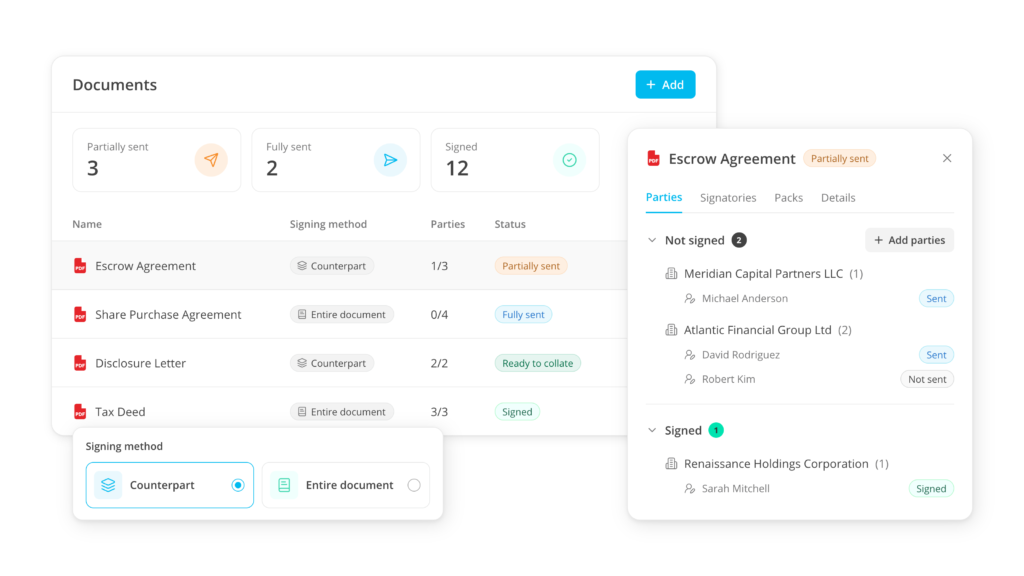
Live status on every signature
See exactly who's signed, who hasn't and what's holding up the deal. No emails, no calls, no guessing.
Signers set up once
Add every entity and signatory once for the matter, then reuse them on every document.
Everything you need to run a clean signing process
Real-time tracking
Know exactly where every signature stands at any moment. No emails, no calls, no chasing — just a live view of the whole deal. Notifications tell you when a pack is sent, signed, voided or needs attention.
Signature pages found for you
Add Word or PDF documents. Legatics detects the signature pages in PDFs automatically, and you check them and tag who signs each one.
Wet-ink packs in one PDF
Download a wet-ink pack as a single PDF with an index, then upload the signed pages and match them to the right document and signatory.
DocuSign integration
Legatics creates the envelope in your firm's own DocuSign account, so your settings and records stay where they are. Status and signed documents come back into the matter, with the envelope history kept alongside.
Packs in draft, pages out early
Build packs for one signer or several at once and keep them in draft. Signature pages can go out while documents are still in draft.
Every way deals are signed
Send signature pages, whole documents in counterpart or one document for everyone to sign. Choose for each document, and mix approaches on the same deal.
How it works
Set up documents and signers
Add documents from your computer, iManage or NetDocuments, or from a list or data room. Choose how each is signed, then set up the entities and people once.
Prepare, send and track
Check the signature pages Legatics has found in your PDFs and tag who signs each one. Download packs for wet ink, or let Legatics create the envelope in your DocuSign account. Statuses update as people sign.
Collate and close
Signed DocuSign pages are matched automatically where pages were tagged. Upload and match wet-ink pages, then collate the execution version once everyone has signed.
When to use Signing
Coordinating every party and signatory
Configure parties and signatories once on the Signers page, then reuse and track them across every document in the matter. Use a placeholder if a signatory hasn't been named yet.
Building signature packs for wet-ink or DocuSign
Create signer or document packs, hold them in draft while you finalize them, then download wet-ink packs or have Legatics create the DocuSign envelope.
Tracking signatures without leaving Legatics
See live status for every signature from one dashboard, with DocuSign status and signed documents coming back automatically.
Assembling the final executed document
Match signed pages back to the right document, party and signatory, then let collation build the execution version once every signatory is signed.
On completion day, the deal team runs the signing matrix
Read More
Use case: Signature page management
At the end of every transaction, the deal team has
Read More
The signing and closing binder connection
For most law firms, signing and closing binder production are
Read More
Why signing shouldn’t live in a separate tool
Most law firms have a signing tool. That’s not the
Read More
Common questions
Yes. Legatics uses your firm's own DocuSign account, and you can connect more than one. Legatics creates the envelope, you place the fields and send from DocuSign, and status and signed documents come back into Legatics.
Yes. Download the pack as a single PDF with an index and send it yourself. Upload the signed pages and match each one to its document, party and signatory.
Copy
Collation puts the signed pages from DocuSign and wet ink together into the execution version. It's available once every signatory is named and has signed. You can reorder, rotate and remove pages and add date-signed annotations.
Yes, on counterpart documents. Each signer's pack goes through DocuSign or is downloaded for wet ink, and collation brings the signed pages together into one execution version.
In counterpart signing, each signer signs separately, and their pack holds either their signature pages or the full documents. In entire-document signing, every signatory signs the same copy in one DocuSign envelope. You choose for each document.
Yes. Signature pages packs can go out while a document is still in draft, and the signed pages are matched to the final version at the end.
No. Signing is its own module. You can still send documents across from a list or data room if you prefer.
Signature page detection uses rules-based logic that has been part of Legatics for years. It isn't generative AI, and no document content is sent to a third-party AI model, so it's covered by the security review your firm has already done on Legatics.
Part of the Legatics platform, also integrates with: